

How To Check Backlinks Manually: The Step-by-Step Workflow Without a Paid Tool
Listen to this article
Browser-native voice. No account required.
A manual backlink check is the first move in many of Mojo Links' spot-audit calls. It does not replace Ahrefs or Semrush for full link analysis - but it answers specific questions those tools cannot: what does Google's own attribution actually show, is this specific placement indexed, did the JavaScript render the link or not. The sequence runs in 4 methods, each takes 5-15 minutes, and the combined output decides whether a full paid-tool audit is warranted.
This post documents the methods Mojo Links uses for spot-checks before a formal audit kicks in: Google Search Console for owned domains, Google search operators for any site, browser view-source for placement verification, and Chrome DevTools for JavaScript-rendered links. The same sequence works for solo operators auditing their own sites without a paid-tool subscription.
What Is a Manual Backlink Check?
A manual backlink check is the process of identifying backlinks pointing to a website using only free tools and direct techniques: Google Search Console, Google search operators, browser view-source, and Chrome DevTools. No paid backlink database (Ahrefs, Semrush, Majestic) is involved. The output is verified, current-state attribution that paid tools cannot fully replicate.
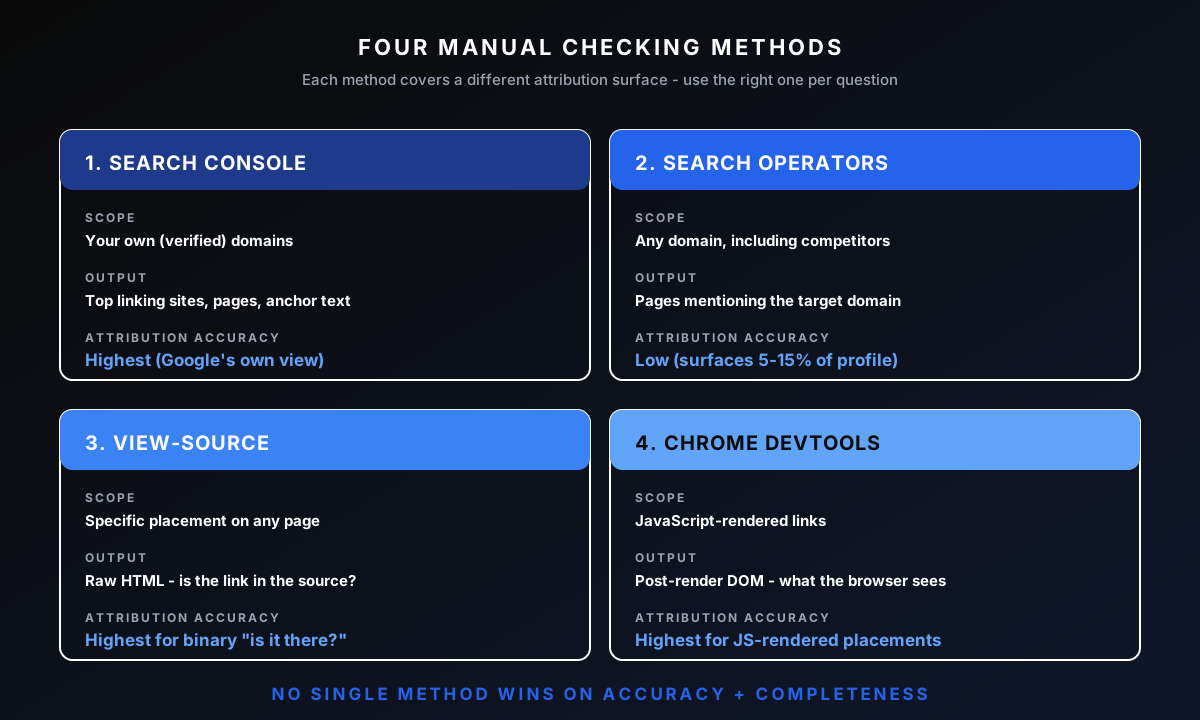
The four manual methods cover different attribution surfaces:
Google Search Console (GSC). Authoritative for your own sites. Shows Google's actual attribution. Limited to domains you have verified.
Google search operators. Work on any site. Surface pages containing references to a target domain via site:, link:, and intext: queries. Less precise than GSC.
Browser view-source. Confirms a specific placement is in the raw HTML. Used when verifying outreach placements or auditing whether a link is truly there.
Chrome DevTools rendered DOM. Confirms a JavaScript-rendered link exists in the post-render DOM. Used when a link does not appear in view-source but shows up in the browser.
Manual checking has trade-offs against paid tools. Paid tools surface 10x more total backlinks because they crawl the broader web. Manual methods surface fewer links but with higher attribution accuracy on the ones they find. The sequence is for spot decisions, not exhaustive audits.
When Should You Check Backlinks Manually Instead of Using a Paid Tool?
Check backlinks manually when the use case is a spot decision on a single site, when Google's own attribution matters more than completeness (paid tools cannot show Google's view), or when the budget does not justify a $99-499/mo Ahrefs or Semrush subscription. For full audits, competitive analysis, or campaign tracking, the paid tools win.
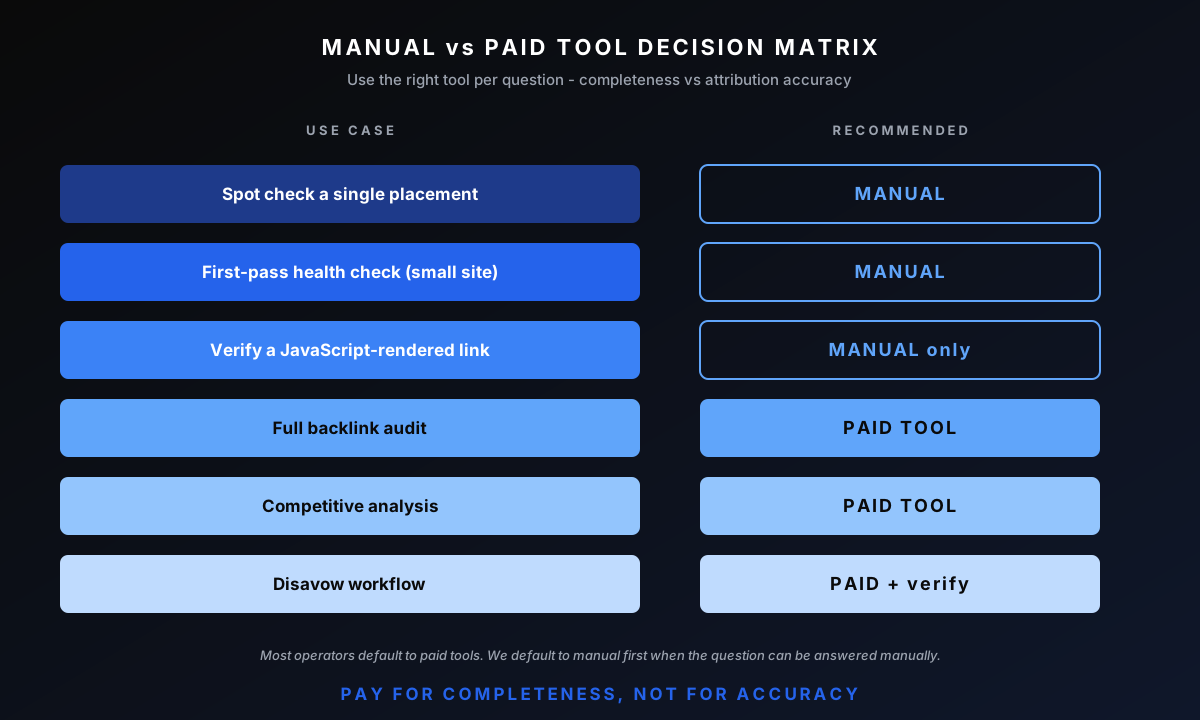
The decision matrix to apply:
Spot check (single placement). Manual wins. Confirming a specific outreach placement actually shipped does not need a backlink database.
First-pass health check on a small site. Manual is enough. Sites under 100 backlinks can be audited end-to-end in GSC + a 5-minute view-source pass.
Verifying a JavaScript-rendered link. Manual only. Paid tools often miss JS-rendered links; the rendered DOM check is the only reliable verification.
Full backlink audit. Paid tool. Ahrefs or Semrush surface the broader network of links you do not know about.
Competitive analysis. Paid tool. Manual methods cannot scale to "show me all the links the top 5 competitors have."
Disavow workflow. Paid tool, then manual verification. Use Ahrefs to surface toxic candidates, then manually verify each before disavow upload.
Most operators reach for paid tools by default. Reach for manual methods first when the question can be answered manually because the answer is more authoritative.
How Do You Check Your Own Site's Backlinks in Google Search Console?
Check your own site's backlinks in Google Search Console by navigating to the Links report (left sidebar > Links). As the Links report in Search Console Help explains, the report shows top linking sites, top linked pages, and top linking text. The report is sampled, a subset of total backlinks rather than all of them, so export the CSV for the fullest list GSC will give you.
The report has three sections. Top linking sites shows referring domains sorted by link count. Top linked pages shows which of your URLs receive the most external links. Top linking text shows the anchor text distribution across your inbound profile. To bucket those anchors into branded, exact-match, and partial-match types automatically, run them through the anchor text checker.
The GSC Links report is the first move on any new Mojo Links engagement. It establishes the baseline: which domains Google is actually crediting, what the anchor distribution looks like, and which pages are receiving the link signal.
Limitations of the GSC Links report:
Sampled data. GSC shows roughly 100,000 links per dimension, not the full set on larger sites.
No DR / authority metric. GSC does not show third-party link quality scores.
Per-link inspection requires manual visit. The report does not show anchor text, placement context, or nofollow status without opening each linking page.
Only for verified properties. You cannot check competitors via GSC.
For broader coverage including links GSC has not surfaced, cross-reference with a paid tool. For attribution accuracy on the specific links GSC does surface, this is the most authoritative source.
How Do You Check Any Site's Backlinks with Google Search Operators?
Check any site's backlinks using Google search operators that surface pages containing references to a target domain. The operators are imperfect - Google deprecated the dedicated link: operator in 2017 - but several combinations still produce useful results.
The operator sequence to run:
site:competitordomain.com - returns pages indexed on the competitor. Not direct backlink data but useful for scoping the target.
"competitordomain.com" -site:competitordomain.com - returns pages on OTHER sites that mention the competitor domain in their text or links. The exclusion removes the competitor's own pages.
"competitordomain.com/specific-page" -site:competitordomain.com - returns pages referencing a specific URL on the competitor. Useful for identifying placements for a specific resource or guide.
intext:"competitordomain.com" intitle:resource - returns resource-page placements specifically. The intitle filter narrows to pages structured as resource lists.
Operator-based checking surfaces 5-15% of the actual backlink set on most sites. It is imprecise but free and works on any domain. For verifying that a competitor placement exists, the operator query is faster than opening a paid tool.
Common operator mistakes: forgetting the exclusion (which floods the results with the competitor's own pages), missing the quotes around the domain (which allows partial matches), and running the search logged-in (which personalizes results based on your search history). Use an incognito window for consistent results.
How Do You Check JavaScript-Rendered Backlinks Google May Not See?
JavaScript-rendered backlinks need browser-side inspection to verify because Googlebot occasionally misses links that only appear after JavaScript execution. Per Google's JavaScript SEO basics documentation, Google does render JavaScript but not on every crawl, so links injected client-side are not always seen.
The verification sequence:
Step 1: Right-click > View Page Source. This shows the raw HTML the server returned. If the link is in this view, Google sees it on first crawl.
Step 2: Open DevTools (Cmd+Opt+I). Inspect the Elements tab. This shows the rendered DOM - the post-JavaScript state. If the link is in the Elements tab but NOT in view-source, it is JavaScript-rendered.
Step 3: Use the URL Inspection tool in GSC. For your own pages, GSC's URL Inspection > Live Test shows what Googlebot rendered. Compare this to your local browser view.
JavaScript-rendered links carry partial signal. Google does eventually render most pages, but the second-pass rendering adds delay (sometimes weeks) and is not 100% reliable on lower-priority pages. If a link only exists in the rendered DOM, treat it as discounted until you verify Google has indexed it.
Frameworks that commonly produce JS-rendered links: React (without server-side rendering), Vue with client-side hydration, Angular SPAs, headless CMS implementations. Modern Next.js and Remix apps with SSR usually do not have this problem.
Which Manual Checking Method Gives The Most Accurate Results?
For your own sites, Google Search Console gives the most accurate results because it shows Google's own attribution, including links third-party tools have not yet indexed. For competitor sites, the search operator combination produces the most useful set, though it surfaces only 5-15% of the actual backlink profile.
Accuracy ranking by method:
GSC for your own sites: Highest accuracy on what is included. Lower completeness because sampled. The links GSC shows are verified by Google.
View-source verification: Highest accuracy on whether a SPECIFIC placement exists. Used for placement confirmation, not for surfacing unknowns.
DevTools rendered DOM: High accuracy on JavaScript-rendered placements. Confirms what the browser sees.
Search operators: Lowest accuracy as a backlink discovery method. Useful for spot-finding specific placements; bad for systematic coverage.
No single method gives both accuracy and completeness. The combination provides operationally useful coverage for spot decisions. For full audits, paid tools win on completeness; the manual methods then verify the most important findings.
What Are The Most Common Mistakes When Checking Backlinks Manually?
Five mistakes destroy the accuracy of manual backlink checks: treating partial Search Console data as complete, missing JavaScript-rendered links, confusing referring domains with total backlinks, running search operators without exclusion filters, and skipping the rendered-DOM check on modern JS-heavy sites.
Treating GSC Links as complete. GSC is sampled. Treating the report as the full inbound profile underestimates the link count on most sites. Use it as authoritative for the links it DOES show, not as a complete list.
Missing JavaScript-rendered placements. Operators auditing via view-source alone miss links rendered post-hydration. The DevTools Elements view catches what view-source misses.
Referring domains vs total backlinks. A domain with 50 pages linking to you counts as 1 referring domain and 50 backlinks. Mixing the metrics produces misleading conclusions.
Operator queries without exclusion. Searching "competitordomain.com" without -site:competitordomain.com returns mostly the competitor's own pages. The exclusion filter is non-optional.
Skipping rendered-DOM checks on JS sites. A modern React or Vue site that returns minimal HTML on first request will not show most of its content in view-source. The Elements tab is the only reliable check.
Who Benefits Most from Learning Manual Backlink Checking?
Three audiences benefit most from manual backlink checking: founders running pre-revenue projects without a tool budget, agencies onboarding new clients who need a 15-minute first-pass before formal audit kickoff, and SEOs verifying specific outreach placements without burning a paid-tool query.
Founders without tool budget. The first 6 months of an SEO project rarely justify $99/mo for Ahrefs or Semrush. Manual checking covers spot decisions until traffic warrants the subscription.
Agency client onboarding. Senior strategists running 5+ active clients use GSC + search operators for fast first-pass health checks. The 15-minute manual audit answers "is anything obviously broken" before the full audit begins.
Outreach managers verifying placements. Confirming a guest post or niche edit actually shipped is faster manually than waiting for the placement to surface in a paid tool's next crawl cycle.
Which Paid Tools Should You Upgrade To When Manual Checking Isn't Enough?
Upgrade to paid backlink tools when manual checking can no longer answer the question: full audits, competitive analysis, disavow workflows, or campaign tracking. The three primary tools each excel at different things, but most operators end up running more than one.
Ahrefs ($99-499/mo). Most-used. Backlink database is the largest. Domain Rating is the industry-default authority metric. Used for full audits, competitive analysis, and the qualification workflow.
Semrush ($129-499/mo). Strong second. Backlink Gap and Backlink Audit features are useful for competitive and disavow workflows. Often run alongside Ahrefs for cross-validation.
Majestic ($49-399/mo). Specialized. Trust Flow and Citation Flow surface spam-tier signal that Ahrefs and Semrush understate. Useful as a tiebreaker on borderline candidates.
For the operational thresholds where Mojo Links upgrades from manual checking to a full paid-tool audit, the backlink audit procedure covers the cross-tool workflow.
How Did Mojo Links Develop This Manual Checking Workflow?
The manual checking procedure comes from Mojo Links onboarding work across 300+ engagements. We use the workflow for first-pass health checks before formal audits and for spot-verifying outreach placements during active campaigns. The methodology integrates with our competitor backlink discovery process and the link prospect qualification scorecard that runs downstream of discovery.
Manual verification is one QA step inside a six-phase acquisition workflow. For the end-to-end program this fits into, see our full link building program.
Frequently Asked Questions About Manual Backlink Checking
Is manual backlink checking accurate enough for SEO decisions?
Manual checking is accurate enough for spot decisions (verify a specific placement, confirm anchor text, check a single competitor). It is not accurate enough for strategic decisions that depend on completeness (full audit, competitive analysis, disavow workflow). Use the right tool for the right question.
Can I check competitor backlinks for free?
Partially. Google search operators surface 5-15% of any site's actual backlinks. That is enough to identify obvious placement patterns but not enough to map the full network. For systematic competitive analysis, a paid tool is required.
Why does Google Search Console show fewer backlinks than Ahrefs?
GSC samples its data and shows only Google-attributed links. Ahrefs crawls the broader web and shows links Google may not have credited. Both views are useful; neither is complete. The accurate count is somewhere between the two.
Does Google still support the link: operator?
No. Google deprecated the dedicated link: operator in 2017. Use the "domain.com" -site:domain.com pattern instead, which surfaces pages mentioning the target domain across the web.
How often should I run a manual backlink check?
For owned sites: weekly GSC check during active link campaigns, monthly otherwise. For competitor spot-checks: only when a specific question arises (a new placement on a known competitor, a sudden ranking shift you want to investigate). Treat manual checks as decision tools, not as a regular reporting workflow.

About Bart Magera
Bart Magera is the founder of Mojo Links. Ten years across YMYL verticals (legal, medical, finance, supplements, crypto, gambling). Trained under Koray Tuğberk Gübür's Topical Authority framework. Author of two SEO books and international speaker.
Want this kind of analysis on your site?
Get a free video walkthrough within 48 hours covering technical health, backlinks, content gaps, and AI visibility.
Related posts
Keep reading on adjacent topics.
- Link Building
 Bart Magera10 min read
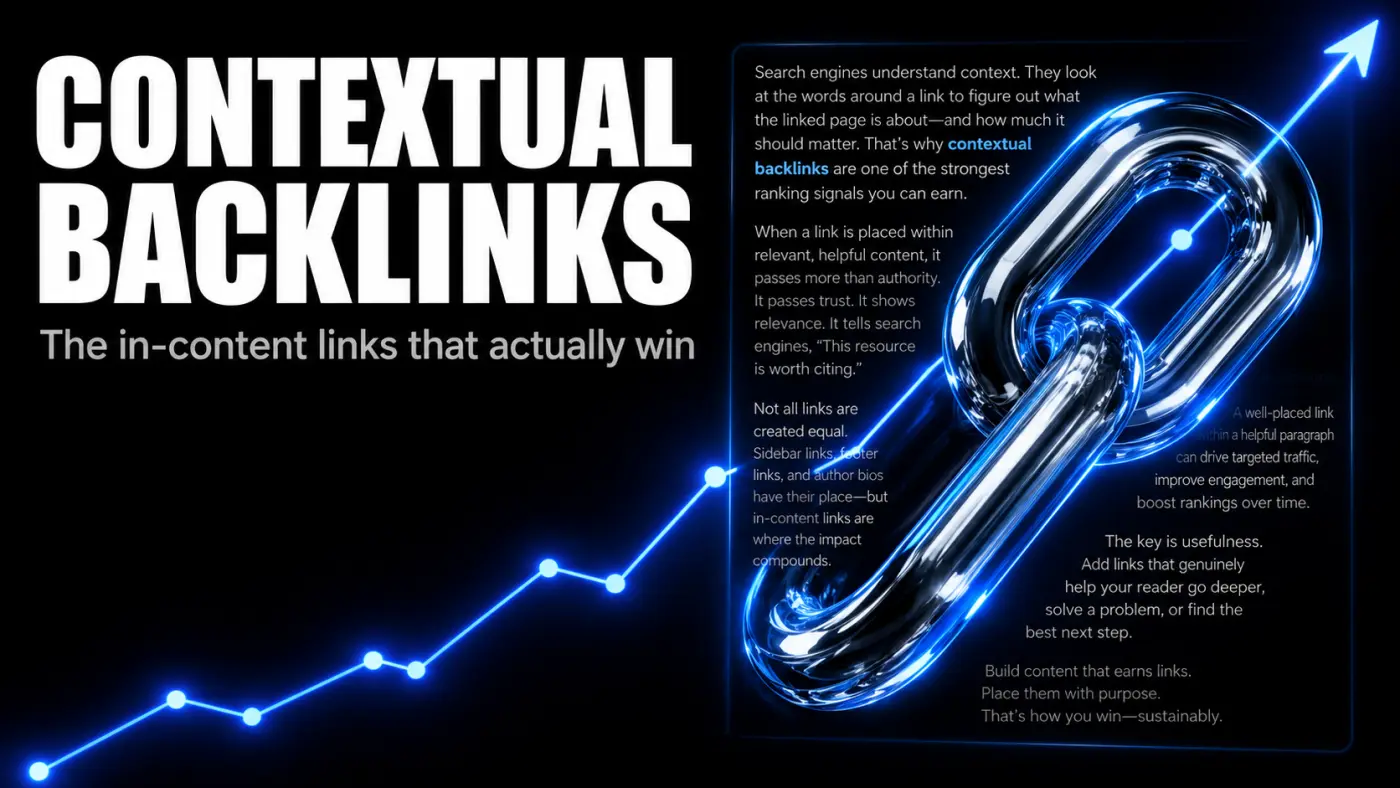
Contextual Backlinks: What They Are, Why They Win, and How To Earn Them
A contextual backlink sits inside the body of an article, surrounded by relevant text, not in a footer or author bio. That placement is what gives it weight. Here is what contextual backlinks are, what makes one high quality, how to earn them, and how to spot the cheap fakes.
- Link Building
 Bart Magera12 min read
What Is White Hat Link Building? Techniques That Work in 2026
The Problem: Why Most Link Building Fails Your SEO You wrote great content. It’s relevant. It’s useful. It even has infographics. But guess what? Crickets. Nobody’s linking. Google’s not ranking. And your “ultimate guide” is buried somewhere on page 7 under a recipe blog and a…
- Link Building
 Bart Magera10 min read
Tiered Link Building: How It Works and How To Do It Safely
Tiered link building layers weaker links behind your strongest ones to pass more authority to your money pages. Here is how the pyramid works, how to build one, which links are worth tiering, the risk SpamBrain introduced, and the lower-risk path I use on client sites.