

JavaScript SEO: How To Diagnose and Fix Rendering Problems
Listen to this article
Browser-native voice. No account required.
A site can look perfect in the browser and be half-invisible to Google. That gap is where JavaScript SEO lives, and it is where a lot of expensive redesigns quietly lose their rankings.
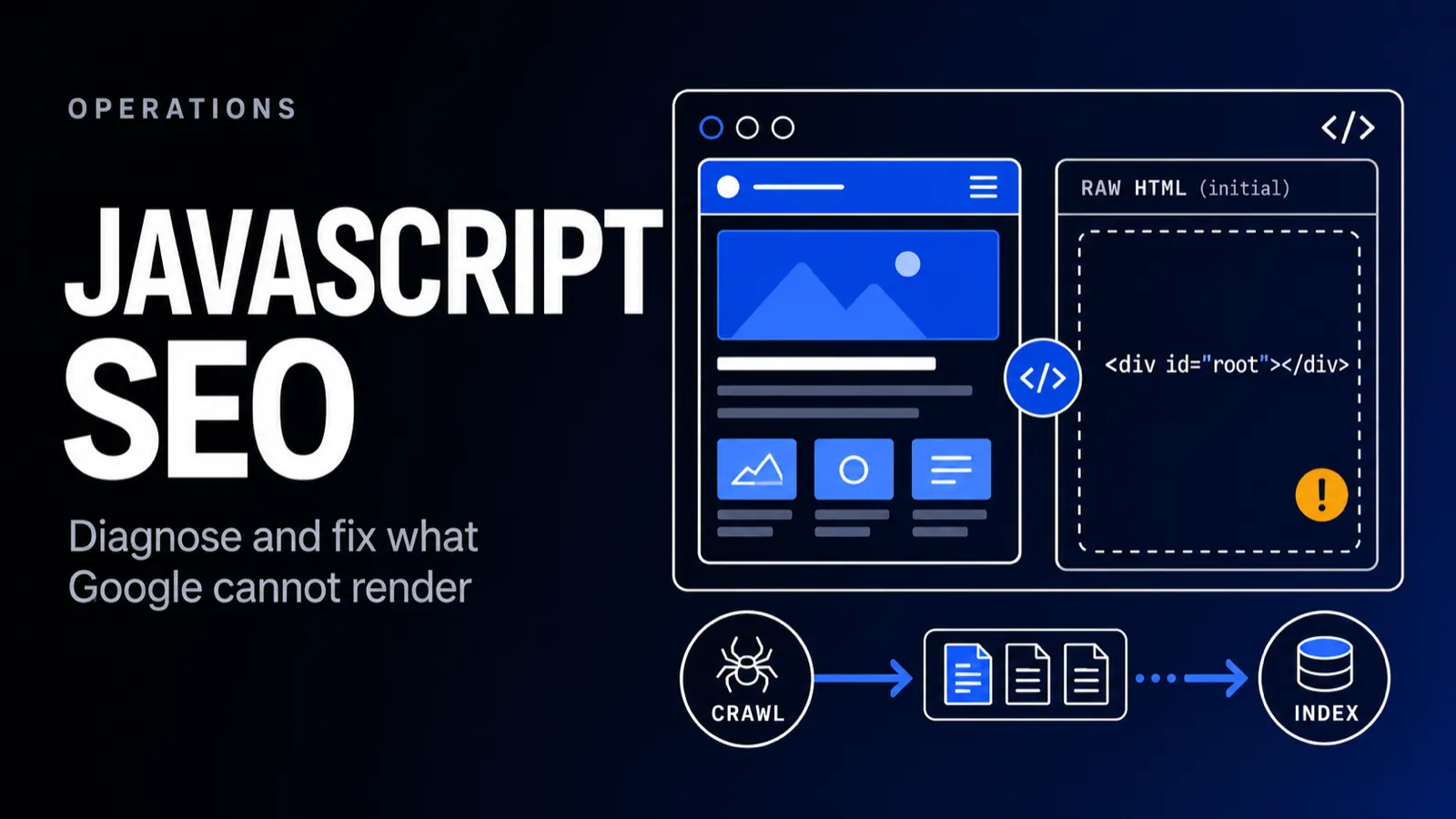
Google can render JavaScript, but not instantly and not always the way you assume. This is how to diagnose whether Google actually sees a JS-dependent site's content, the rendering problems that hide it, and the fixes to apply. It is the part of a technical SEO audit that catches the issues a content review never would.
What Is JavaScript SEO?
JavaScript SEO is the practice of making JavaScript-dependent content crawlable, renderable, and indexable by search engines. It covers how Googlebot processes JS, why content rendered in the browser can be missed, and the rendering and linking choices that decide whether a JS site ranks. It is a technical discipline, not a content one.
It matters most for sites built on frameworks like React, Vue, or Angular, where the initial HTML can be nearly empty and the real content is assembled by JavaScript after the page loads. If Google never runs that JavaScript, or runs it late, the content is effectively missing.
The stakes rise every year as more of the web moves onto frameworks. Search engines meet JavaScript on most modern sites now, and the sites that treat rendering as an SEO requirement rather than an engineering afterthought keep their organic revenue when they replatform.
What JavaScript Actually Does on a Modern Website
JavaScript is the code that turns a static page into an application: menus, filters, forms, personalization, tracking, and on many stacks the content itself. A typical ecommerce website now ships more script than HTML.
That range is why JavaScript SEO problems vary so much between websites. A site using JavaScript for a carousel has a cosmetic dependency. A single-page app using it for every word on the page has an existential one.
For example, an online store might render product grids client side while its CMS pages stay static. The same site can be fine and broken at once, which is why page-type sampling matters early in the audit process.
Can Google Crawl and Index JavaScript?
Yes, Google crawls, renders, and indexes JavaScript, but on a delay. It fetches the raw HTML first, queues the page for rendering, then runs the JavaScript in a headless browser before indexing the rendered result. That deferred render is the catch: content that only appears after JS executes waits in line to be seen.
Other search engines and most AI crawlers are far less capable. Many do not execute JavaScript at all. So "Google can handle it" is not the same as "everyone can handle it," and Google's own JavaScript SEO documentation is explicit that rendering is resource-limited and deferred.
How Google Renders JavaScript
Googlebot processes a JS page in three stages: crawl, render, index. It first fetches the raw HTML without running any JavaScript. The page then enters a render queue, where a headless Chromium runs the JS when resources are available. Only the rendered DOM, the page after JS has executed, gets indexed.
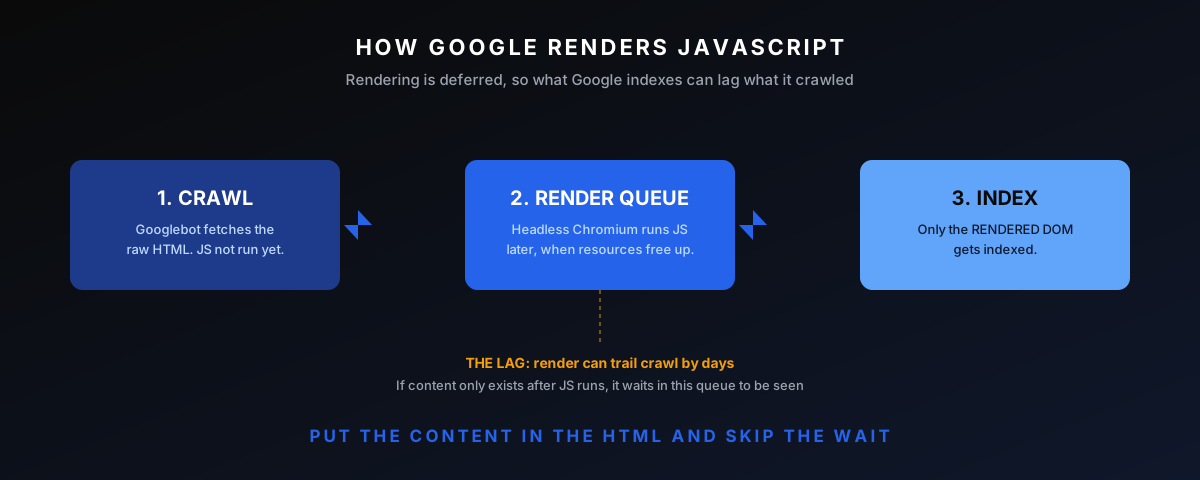
The render queue is the part most people miss. Rendering can trail crawling by anything from minutes to days depending on the site and Google's capacity. For a news site publishing time-sensitive content client-side, that lag alone can mean the difference between ranking and missing the window entirely.
Googlebot's Evergreen Renderer
Googlebot renders pages with an evergreen version of Chromium, the same engine behind Chrome, kept close to the latest stable release. Modern JavaScript features generally work during javascript rendering, which killed the old advice about transpiling for an ancient headless browser.
Evergreen does not mean unlimited. The renderer runs on a tight resource budget, declines permission prompts, and does not scroll or click the way a person does, so code that waits for interaction never executes for Google Search.
Timeouts are the quiet killer. When an API call or script chain takes too long, Googlebot indexes whatever HTML exists at the cutoff, and on a slow single-page app that can mean a spinner and a footer.
Rendering Costs Crawl Budget
Rendering a JavaScript page costs far more compute than parsing static HTML, and Google spends that budget unevenly across websites. Large JavaScript websites feel this as slower indexing of deep pages, because every page needs a second, expensive pass.
The symptom appears in Google Search Console as pages sitting in Discovered or Crawled, currently not indexed. The fix is less rendering work per page through server-rendered or static output, not another XML sitemap submission.
Common JavaScript SEO Problems
Most JS SEO issues come down to one thing: content or links that exist for users but not for the crawler at the moment it matters. These are the ones that surface most often in rendering audits.
Content Missing from The DOM
The most common problem is content that never makes it into the rendered DOM Google indexes, or only appears after an interaction. If the main content depends on an API call that fails, times out, or requires a click, Google may index an empty shell. Your React app renders beautifully for users and hands Googlebot an empty div.
You see this most on single-page apps where the homepage looks rich but view-source is a near-empty body with one script tag. Users never notice because their browser runs the JavaScript instantly. Googlebot, fetching the raw response first, sees almost nothing until the render queue catches up.
Links Google Cannot Follow
Google follows links that are real anchor tags with an href attribute. A <div onclick="router.push()"> that routes via JavaScript is not a link Google can crawl, so the pages behind it may never be discovered. Pagination, faceted navigation, and "load more" buttons built without real hrefs orphan everything downstream of them.
The fix is simple and the audit catches it fast: every link that should pass equity or be discoverable needs a real href pointing at a real URL. Keeping the JavaScript routing for the click behavior is fine, as long as the anchor underneath is genuine.
Lazy-Loaded Content and Infinite Scroll
Content that loads only on scroll or interaction is a risk, because Googlebot does not scroll or click the way a user does. Infinite-scroll feeds with no paginated URLs, and images or text that load only when in view, can be invisible to the crawler. The content has to be reachable without a user gesture.
The standard fix is to back the infinite scroll with real paginated URLs Google can crawl, and to use native lazy-loading for images so the markup is present even before the image loads. The user keeps the smooth scroll; the crawler gets a path to every item.
Blocked JavaScript Resources
If the JavaScript and CSS a page needs to render are blocked in robots.txt, Google cannot render the page properly and may index a broken version. This is a self-inflicted wound you still see regularly: a blanket disallow on a /static/ or /assets/ directory that quietly stops the page from rendering at all.
It is easy to introduce by accident during a migration, when an old robots.txt rule carries over to a new framework that serves its bundles from a different path. The rendered-HTML check catches it immediately, because the screenshot Google generates comes back broken or unstyled.
Slow or Failed Hydration
Hydration is when client-side JavaScript attaches to server-rendered HTML to make it interactive. When hydration is heavy or fails, the page can be slow, shift layout, or break interactivity, hurting both Core Web Vitals and the user experience. A page that takes seconds of JS work before it is usable is a ranking and conversion problem at once.
Server-rendered content that depends on hydration to function can also leave users staring at a page that looks ready but does not respond. The content indexes fine, but the experience signals and conversions suffer, which is its own SEO cost over time.
Images, Alt Text, and Lazy Loading
Images that JavaScript injects need the same scrutiny as text. Set alt attributes in the code that creates the element, use native lazy loading on real img tags, and keep the URL in the src attribute rather than a data attribute a script swaps later.
Google indexes images from the rendered DOM, but image discovery works best when the URL is stable and crawlable. A gallery that only materializes on interaction is invisible twice over.
Duplicate Content and Impossible States
App-shell architectures can serve near-identical raw HTML for every route, which search engines may cluster as duplicates before rendering fills in the differences. Server side rendering removes that ambiguity at the source.
Long-cached JavaScript files create a stranger failure: Google renders a page with an old script version against new HTML, producing states that never existed for visitors. Version the filenames on every release so Google cannot mix them.
One habit ties all of these together: whenever a page misbehaves in an unexplained way, ask what its HTML looked like before scripts ran. Half of JavaScript SEO is remembering that Google grades two versions of every page, and knowing which one it graded.
How To Diagnose JS Rendering Issues
Diagnosis is about comparing what the browser shows a human with what Google actually renders. The browser is a liar here, because it always runs the JavaScript. These are the checks that show the truth.
The Rendered-HTML Check
The fastest reliable check is Search Console's URL Inspection tool, which shows the rendered HTML Google sees and a screenshot of the rendered page. Compare that against the live page. If the main content, links, or metadata are present in the browser but missing in the rendered HTML, you have found the problem and confirmed it with Google's own renderer.
View Source Versus Inspected DOM
A quick first pass is comparing view-source (the raw HTML) with the inspected DOM (after JS runs). If content is in the inspected DOM but absent from view-source, it is being added by JavaScript and depends on rendering to be indexed. The Mobile-Friendly Test and Rich Results Test also expose the rendered HTML, as Ahrefs covers in its JavaScript SEO breakdown.
Crawl with Rendering On
For a whole-site view, run a crawler such as Sitebulb or Screaming Frog in JavaScript-rendering mode, then compare the rendered crawl against the raw one. Pages that have content and links in the rendered version but not the raw version are the ones relying on JS, and the ones to prioritize. Also disable JavaScript in the browser to see the bare experience Google starts from.
The two-crawl comparison is the most revealing test to run on a JS site. A big gap between the raw and rendered crawls, in word count, in links found, in titles present, is a direct measure of how much the site is betting on rendering working. The bigger that gap, the more fragile the rankings.
Keep evidence from every check. Screenshot the rendered HTML, save the crawl exports, and date them. Rendering issues recur, and the before-and-after trail is what proves the fix moved the graph.
Response HTML Versus Rendered HTML: The Element Checks
The response HTML is what the server returns before any script runs. The rendered HTML is what exists after JavaScript finishes. Every element that differs between the two is a place where Google can see something different from what users see.
Whole-page eyeballing misses the detail, so run the comparison element by element: title tag, meta description, h1, canonical tag, robots directives, and the body copy itself. Each one has its own failure mode and its own fix.
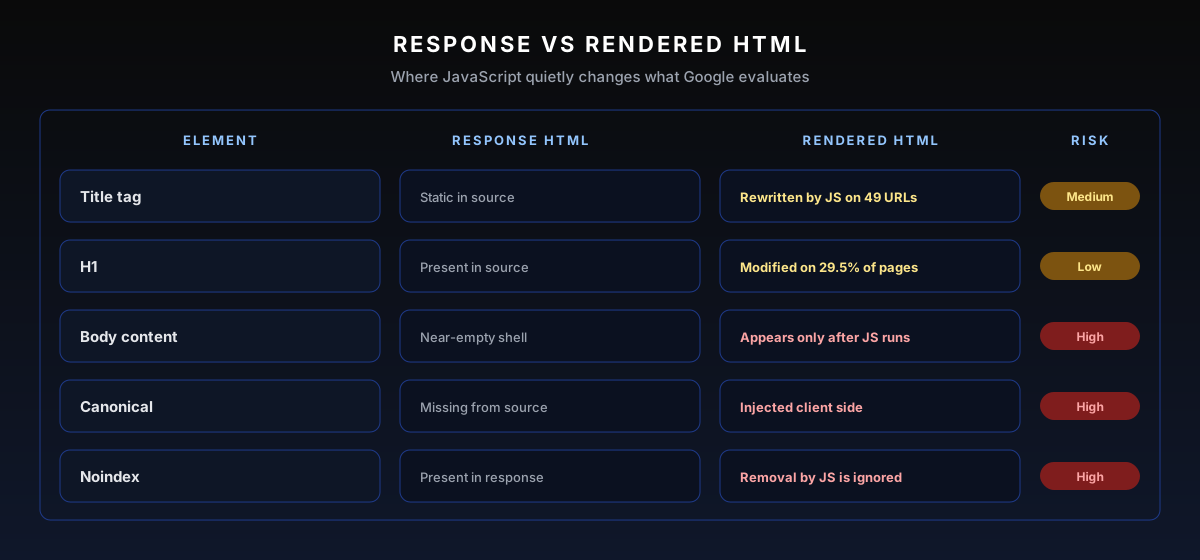
Titles and h1s rewritten by JavaScript usually get picked up, but every rewrite is a chance for the wrong version to be indexed, and snippets can take the response version before rendering catches up. Make sure the rendered value is the one you actually want ranking.
How common is this in practice? In one recent Sitebulb crawl of a roughly 2,500-URL JavaScript website, the tool flagged JavaScript rewriting the page title on 49 URLs and rewriting the h1 on 745 URLs, 29.5% of the whole site. The hint-by-hint walkthrough of that audit sits in the Sitebulb section below.
The same crawl found 82.4% of pages carrying body text that only exists after JavaScript execution. Not one word of it was visible to a crawler that stops at the response HTML.
Treat the hint counts as a triage list, not a scoreboard. A title rewritten by a script that sets the same value is cosmetic; a canonical injected to a different URL is a fire. The severity column exists exactly for that sorting.
Numbers like these are normal on framework sites, not extreme. Well-built pages drift too, as every deploy can change what JavaScript injects, which is why this diff belongs in monthly monitoring and not just the initial audit.
Meta Tags, Canonicals, and Directives in JavaScript
Meta tags controlled by JavaScript are a special risk class because they instruct crawling and indexing itself. A copy bug costs one page. A directive bug can deindex a template.
Titles and Meta Descriptions
Make sure every page ships a unique title tag and meta description in the response HTML. Frameworks make it easy to leave one hardcoded default in index.html, which is how a 5,000-page site ends up describing every page identically in search engines.
Canonical Tags
Google reads JS-injected canonicals, but a late canonical is a common source of duplicate-content clustering on JavaScript websites. Put the canonical tag in the initial HTML and never let a script rewrite it to a different URL after load.
Robots Directives and The Most Restrictive Rule
When the response HTML and the rendered HTML disagree on directives, Google honors the most restrictive one. A noindex in the response usually stops rendering entirely, so the script that was supposed to remove it never runs.
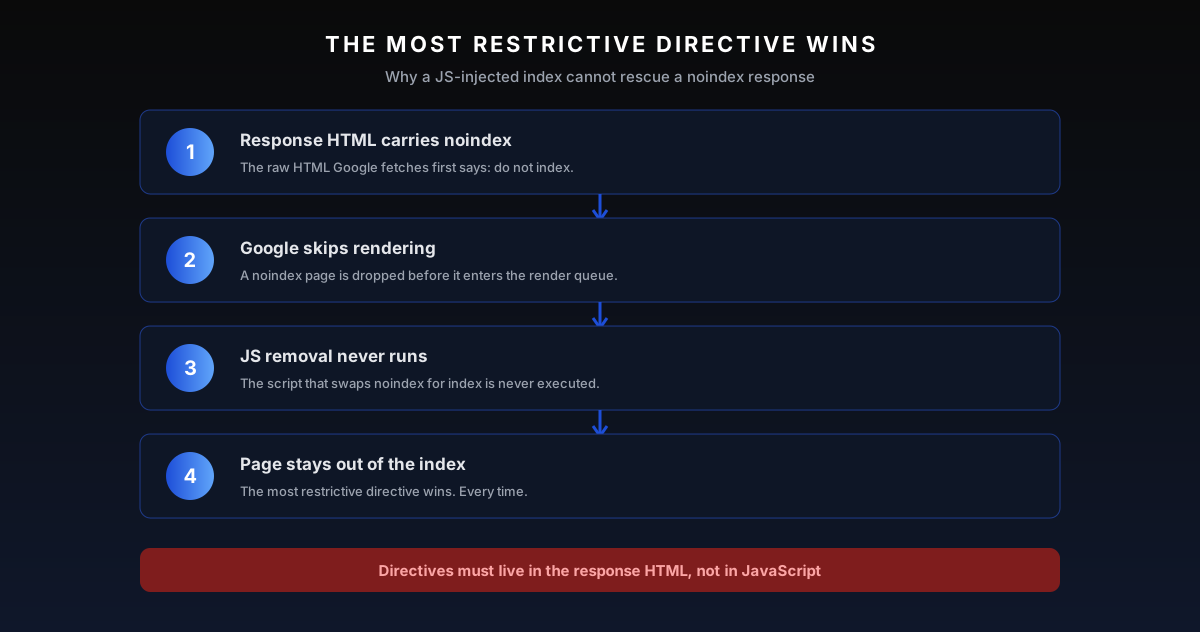
The trap works in reverse as well. A nofollow that only exists in the raw HTML still counts even if JavaScript strips it client side. Set robots directives server side and treat them as code the front end is not allowed to patch.
Structured Data on JavaScript Frameworks
Google processes JSON-LD injected by JavaScript, so structured data on a framework site can work. The operational question is not whether it works but whether you can prove the markup exists in the rendered output on every template that needs it.
Validate against the rendered HTML, not the source templates. The Rich Results Test shows exactly what Googlebot rendered, and schema that fails there does not exist as far as rich results are concerned.
On React stacks, next/head or the NextSeo package keeps schema server rendered, and Vue and Nuxt have equivalents. Client-only injection inherits every risk in this guide, so JSON-LD for money pages belongs in the initial HTML.
Watch for split-brain schema after redesigns, where the server ships one Organization block and JavaScript injects another with different values. Google reads both, and conflicting markup erodes trust in all of it.
URLs, Routing, and Status Codes on JavaScript Sites
Routing is where single-page apps quietly lose crawlability. Google needs unique, crawlable URLs that return honest status codes, and JavaScript routers provide neither by default.
Fragment URLs are the classic example. Anything after a # is ignored at crawl time, so /app#/pricing and /app#/contact are one URL to Google Search. Use History API routing so every view gets a real path of its own.
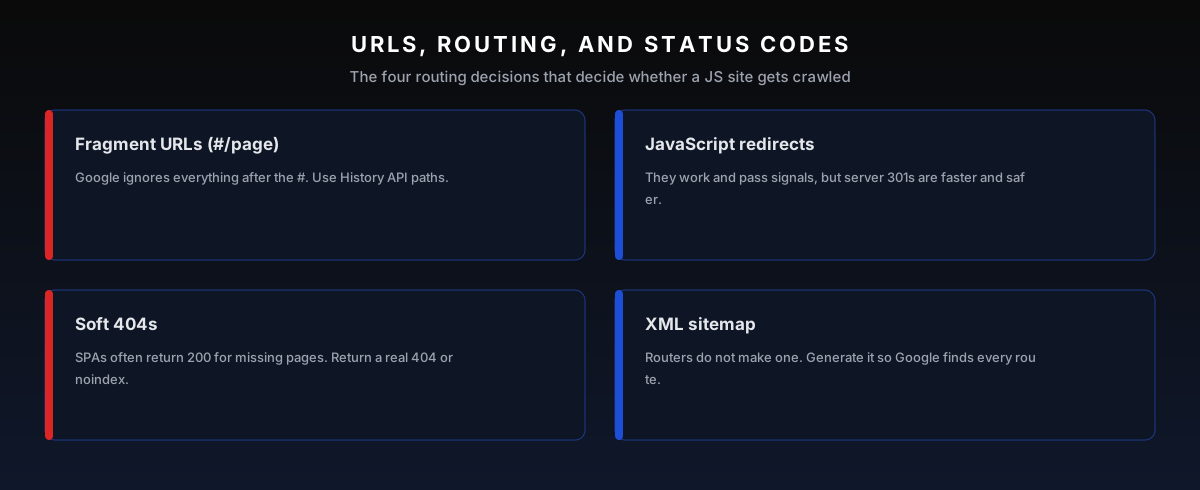
JavaScript redirects work and pass signals, but they only apply after rendering. Server-side 301s are processed on the first fetch, which is why they stay the default for migrations.
Soft 404s are the single-page-app signature mistake. A router that renders a Not Found component while returning HTTP 200 teaches Google to index error pages. Return a real 404 status, or noindex the error route when the stack cannot manage it.
Two housekeeping items finish the job. Generate an XML sitemap at build time, because client side routers do not make one, and on international sites keep hreflang in the response HTML or HTTP headers, never in JavaScript alone.
How To Run a JavaScript SEO Audit in Sitebulb
Sitebulb is the crawler this workflow is built around since it fetches every page twice in one crawl, once as response HTML and once rendered in Chrome, then reports the differences as scored hints. The whole diagnosis above, automated across the site.
Enable the Chrome crawler and the response versus rendered comparison before launching. The hint output groups issues the way this guide does: titles and h1s modified by JavaScript, canonicals only in the rendered HTML, noindex only in the response, and body copy that appears only after javascript rendering.
A Worked Example: Three Hints from One Crawl
Here is what that output looks like in practice, on a real JavaScript website of roughly 2,500 pages: every page crawled with the Chrome crawler, raw and rendered HTML compared on each one. Three hints told the story of the whole build.
The first card worth opening: Page Title modified by JavaScript, scored Medium. 49 URLs, 1.94% of the crawl, shipped one title in the raw HTML and let a script overwrite it after load. Google usually indexes the rewritten version, but on those 49 pages nobody had decided which version was the right one.

Click View URLs on any card and Sitebulb lists every affected page with both versions side by side. The h1 variant of the same hint fired on 745 pages, 29.53% of the crawl: nearly a third of the templates rewrote their main heading in the browser. At that scale the fix is a template change, not page-by-page cleanup.

The third hint was the big one. Contains JavaScript content fired on 2.1K pages, 82.4% of the build: body copy that only existed in the rendered HTML. That single number said the whole thing lived or died by Google's renderer, and it turned a routine crawl into a rendering project.

From there the loop is mechanical: fix the template, re-crawl, watch the hint count drop. Three hints compressed a 2,500-URL audit into three decisions, which is exactly what a rendering crawler is for.
Screaming Frog runs the same comparison with JavaScript rendering enabled, and either tool beats manual spot checks at any scale past a handful of pages. Pick one and make the two-crawl diff a standing part of the process.
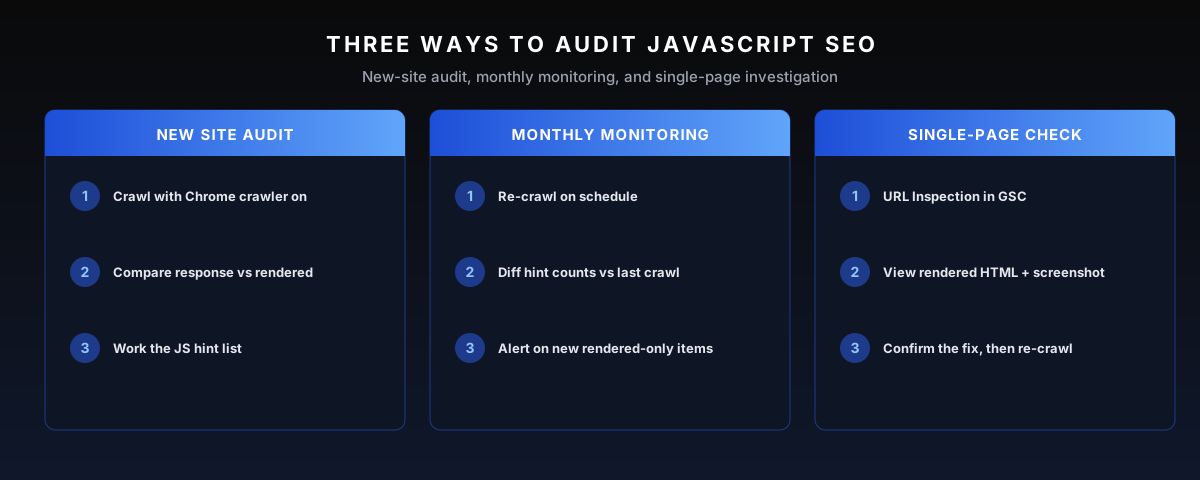
Three workflows cover the operational need. Run a full rendered crawl on every new site audit. Re-crawl monthly and diff hint counts against the previous crawl, as deploys change rendering behavior without telling anyone. Investigate single pages through URL Inspection when one URL misbehaves.
The monthly cadence is the part most teams skip, and it is where regressions get caught early; it is baked into the monthly SEO service precisely because JavaScript sites break quietly. Find the affected pages in the crawler, fix the template, then confirm in Google Search Console that the rendered HTML shows what you want.
Hint severity does the sorting for you. Sitebulb marks each finding as an issue or a potential issue and scores its importance, so a crawl of thousands of pages compresses into a short, ranked worklist. Export the URL list per hint and attach it to the ticket; engineers fix faster when the exact pages are in the file.
Rendering Strategies Compared
Where the HTML comes from is the single biggest factor in JS SEO. There are four broad strategies, and they are not equal for search. The goal is to get real content into the initial HTML response so rendering is not a prerequisite for being seen.
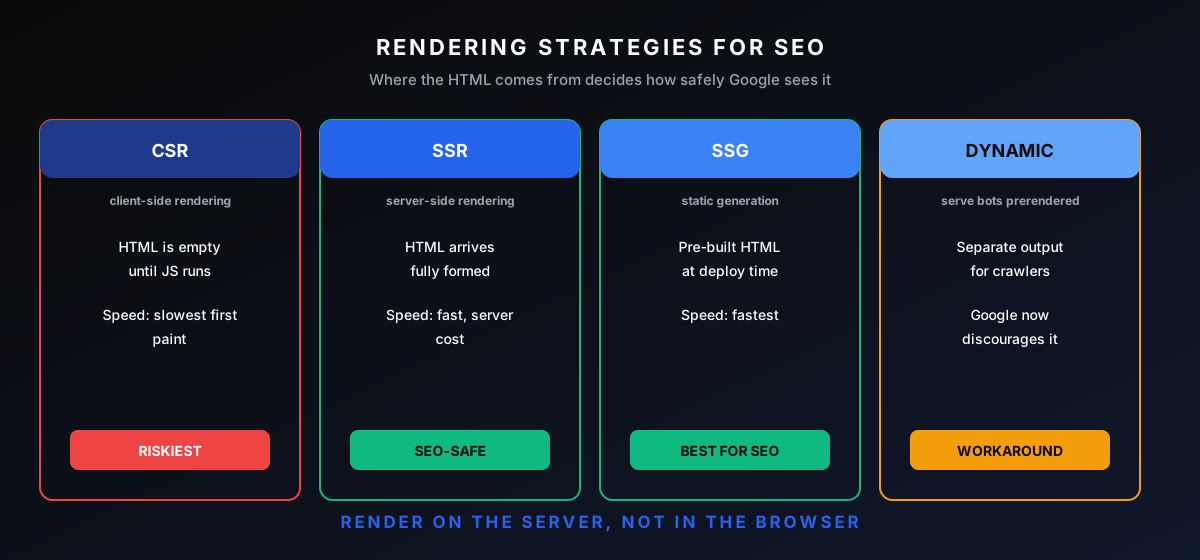
Client-side rendering ships an empty shell and builds everything in the browser, which is the riskiest for SEO. Server-side rendering returns fully formed HTML on each request. Static generation pre-builds HTML at deploy time, the fastest and safest. Dynamic rendering serves crawlers a pre-rendered version separately, which Google now treats as a workaround rather than a recommendation on web.dev.
The right choice depends on how often the content changes. Mostly static content, like a blog or marketing site, should be statically generated; it is the fastest and the safest. Content that changes per request or per user wants server-side rendering. Pure client-side rendering is fine for the parts of an app behind a login, where SEO does not apply, and a poor default for anything that needs to rank. This split is the heart of SaaS SEO, where the marketing pages must rank while the product sits behind a login.
Choose per page type, not per site. Money pages, category hubs, and editorial pages belong on static generation or server rendering with no exceptions, while logged-in dashboards and checkout flows can stay client rendered forever without an SEO consequence.
Hybrid frameworks make the split cheap to implement, which removed the last good excuse. The build can statically generate ten thousand product pages at deploy time and still hydrate interactive components on top of them.
Performance: JavaScript Weight and Core Web Vitals
JavaScript SEO and performance meet at Core Web Vitals. The same bundles that delay rendering for Googlebot delay paint and interactivity for visitors, and Google measures both sides of that coin.
The pattern across framework sites is consistent. Largest Contentful Paint suffers first as bundles grow, Interaction to Next Paint follows once hydration starts blocking the main thread, and layout shift creeps in when late scripts inject components after first paint.
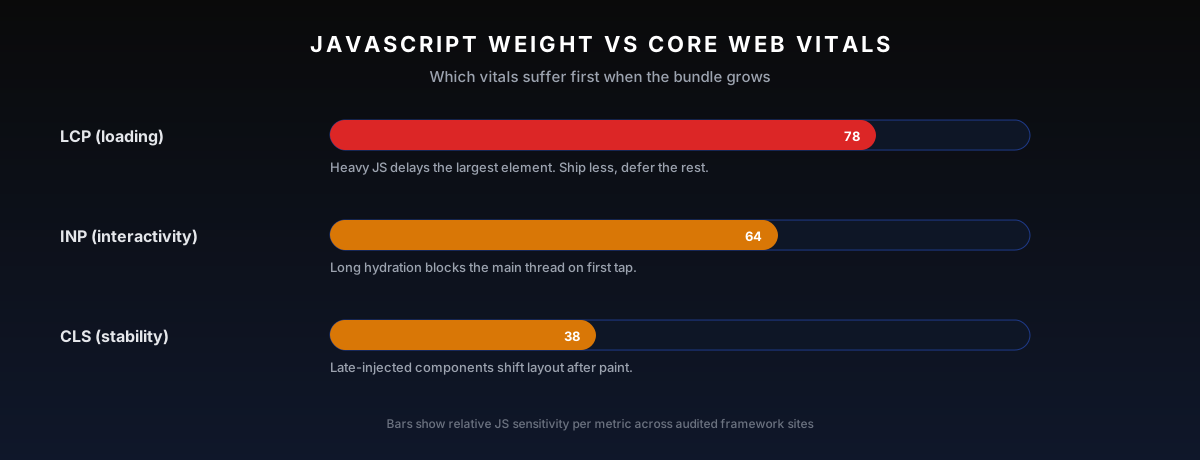
The fixes are engineering work, not markup tweaks. Code splitting, deferring non-critical scripts, and cutting third-party scripts all shrink what a page ships. Less code means faster javascript rendering for Google and better vitals for visitors at the same time.
Stylesheets belong in the same review. Render-blocking CSS and JavaScript files in the head delay first paint everywhere, and blocked .js or .css files in robots.txt can stop Google rendering the page at all. Keep those files crawlable. Always.
A stray robots txt rule remains the fastest way to blind the renderer. It survives replatforms since nobody reviews robots txt in code review, so it earns an explicit line in the audit checklist rather than an assumption.
Measure on real pages, not lab demos. Field data in the Chrome UX Report reflects what actual visitors experienced, and Google uses field data for ranking, so a fast lab run on a developer laptop proves little about the template under load.
The Fixes To Apply
The fixes follow the diagnosis directly. If content is missing from the rendered HTML, the answer is almost always to render it server-side or statically so it ships in the initial response. For most framework sites that means turning on SSR or pre-rendering the routes that matter for search.
The smaller fixes are just as important. Replace JavaScript navigation with real anchor tags so links are crawlable. Unblock the JS and CSS resources in robots.txt so Google can render. Make lazy-loaded content reachable without interaction, and give infinite-scroll feeds real paginated URLs. None of these are exotic; they are the difference between a site Google can read and one it cannot.
Prioritize by revenue exposure, not by hint count. A rendering gap on forty money pages matters more than a title rewrite on seven hundred archive pages, and the fix list should read in that order. Find the template that produces the worst gap, ship the fix, and re-crawl before touching the next one.
Deploys are where fixes rot as well. A hydration bug fixed in March quietly returns in a June release unless the two-crawl diff runs on a schedule, so wire the check into the release process the same way performance budgets are wired into CI.
JavaScript SEO Best Practices
The best practices below compress this guide into the checks that keep a framework site indexable. Run them at build time and in code review, not after rankings drop.
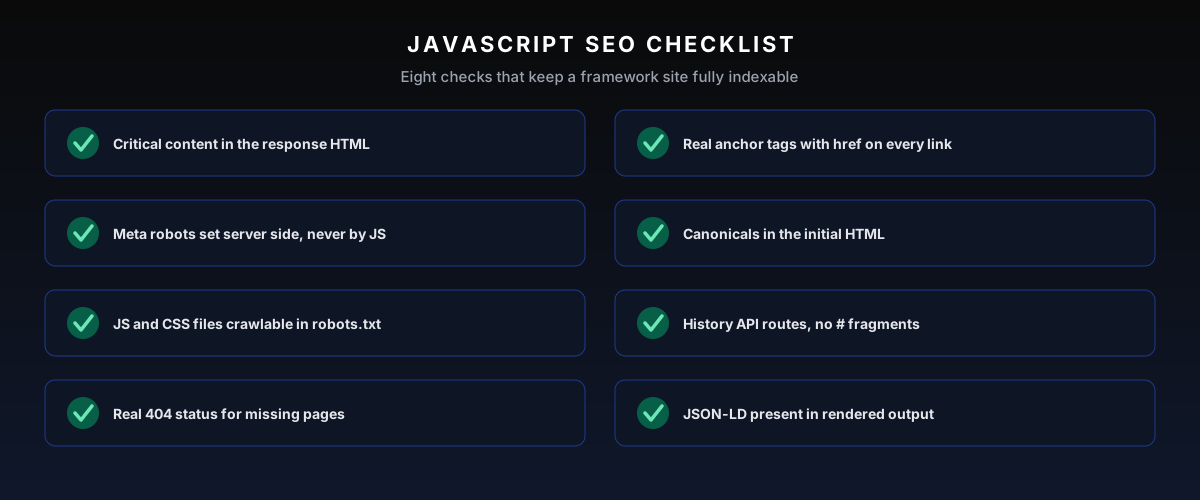
Critical content in the response HTML. Server side rendering or static generation for every page that needs to rank.
Real links. Anchor elements with href attributes on anything that should be discovered.
Directives set server side. Meta robots, canonical tags, and hreflang live in the initial HTML, never JavaScript alone.
Crawlable resources. No JavaScript or CSS files blocked in robots.txt.
Honest status codes. Real 404s for missing pages and server 301s for moved URLs.
History API routing. Unique paths for every view, no fragments, an XML sitemap generated at build.
Structured data in the rendered output. Validate what Google renders, not what the template intends to inject.
A performance budget. Code splitting and script deferral so javascript rendering finishes inside Google's patience.
Print the checklist into the definition of done for any sprint that touches templates or routing. Rendering regressions are cheap to prevent at code review and expensive to rediscover a month later in Google Search Console, after the traffic graph already said it.
Where JS SEO Fits in An Audit
JavaScript rendering is part of the technical phase of a full audit, sitting right alongside crawlability and indexation. A JS-heavy site that fails the rendered-HTML check has a foundation problem, and no amount of content or links fixes it until the content is actually visible. It is one of the first things to check, covered in the SEO audit checklist.
It is also a frequent culprit behind a sudden ranking loss after a redesign or migration to a new framework. When traffic drops right after a relaunch, a rendering regression is high on the suspect list, which is why a JS check is part of any sudden traffic drop diagnosis.
Weight matters here. In a full technical audit, rendering findings usually sit near the top of the priority stack, above minor markup issues and below only outright indexation blockers, since they decide visibility in Google Search results for whole templates at once.
The JavaScript layer also changes who fixes things. Most rendering fixes land in engineering sprints, not in a CMS, so the audit deliverable needs file-level specificity that a developer can act on without translation.
JavaScript SEO and AI Crawlers
There is a newer reason this matters more than it used to. The crawlers behind ChatGPT, Perplexity, and other AI answer engines are mostly far less capable than Googlebot, and many do not execute JavaScript at all. They read the raw HTML and move on, which makes rendering a foundation of answer engine optimization.
So a client-side-rendered site that Google eventually sees through its render queue can be completely invisible to the AI crawlers that increasingly drive discovery. If you want a brand to show up in AI answers, the content has to be in the initial HTML. Server rendering is no longer just a Google optimization; it is the price of entry for AI visibility too.
This is not speculation. The Common Crawl Foundation, whose open dataset trains much of what these models learn from, has written about why your content must exist in AI training data. In his AI Visibility Audit field guide, their Web Intelligence Lead Stephen Burns is blunt that many AI crawlers "fetch HTML but may not execute JavaScript," so content that only appears after JS runs can be captured as an empty shell. His validation is the same raw-versus-rendered check described above.
The response-only behavior of these crawlers is measurable. Fetch a page with curl and count how much of the page appears; that is roughly what an AI search engine sees. On client side apps, the answer is usually a menu and a copyright line.
For example, a server rendered blog article that shows up in ChatGPT citations can sit next to a client side pricing page the same model has never once quoted. The fix is the server-first delivery this guide keeps arriving at, and it is why AI visibility work starts with rendering.
The commercial stakes keep growing. Every quarter, more buying research starts inside an AI answer instead of a results page, and a site those crawlers cannot read is absent from the consideration set before price ever comes up.
How Frameworks Change The JavaScript SEO Work
Every framework fails differently, so the framework decides the checklist. React alone renders client side by default; Next.js moves the same components to server side rendering or static generation and removes most of the risk at the architecture level.
Vue behaves like React, with Nuxt as its server rendered counterpart, and SvelteKit ships server-side rendering out of the box. Angular Universal exists but shows up far less in the wild, which tracks with how often Angular sites surface rendering issues in audits.
The practical rule for a new build: pick a hybrid framework and make client side rendering the exception you justify per component, not the default the website falls back on.
Migrations deserve the same scrutiny in reverse. A replatform from a rendered stack to a client side rendering setup is one of the most common causes of the post-launch traffic drops covered in the sudden traffic drop guide.
Framework version upgrades deserve a crawl of their own. Major releases change hydration behavior and router defaults, and an upgrade that ships silently in a sprint can flip a template from static output to client rendering without anyone touching SEO settings.
When JavaScript Is Not The Problem
Not every ranking problem on a JavaScript site is a rendering problem. If the rendered HTML checks out page by page, the diagnosis moves on to the usual suspects: thin copy, internal linking, and link authority.
The two-crawl diff gives that answer quickly, which is its real value. It rules rendering in or out in an afternoon, instead of leaving JavaScript as the permanent scapegoat for every dip.
Common Mistakes
The biggest mistake is assuming Google "just handles JavaScript now" and moving on. It handles it on a delay, partially, and only for Google. Building a content site as a pure client-side app and hoping for the best is how sites launch invisible.
The other two repeat constantly. Treating dynamic rendering as a permanent solution, when Google has said to render properly instead. And testing only in the browser, which always runs the JavaScript and so never reveals the problem. If your only test is "it looks fine for me," you have not tested JS SEO at all.
Frequently Asked Questions
Does Google Index JavaScript Content?
Yes, Google renders and indexes JavaScript content, but on a delay through a render queue, and it indexes the rendered DOM rather than your raw HTML. Content that only appears after JS runs can be indexed late or, if rendering fails, not at all. Other search engines and AI crawlers handle JS far less reliably.
Is React or Next.js Bad for SEO?
No, not when rendered correctly. React on its own, rendered client-side, is risky because the initial HTML is empty. Next.js solves this by supporting server-side rendering and static generation, which put content in the initial HTML. The framework is fine; the rendering strategy is what decides SEO outcomes.
Is Server-Side Rendering Better Than Client-Side for SEO?
Yes. Server-side rendering returns content in the initial HTML, so Google sees it on the first crawl without waiting for the render queue. Client-side rendering ships an empty shell that depends on JS execution to show anything. For content that needs to rank, server rendering or static generation is the safer choice.
How Do I Test If Google Sees My JavaScript Content?
Use Search Console's URL Inspection tool to view the rendered HTML and screenshot Google generates, and compare it against your live page. If the main content or links are missing from the rendered HTML, Google is not seeing them. A JS-rendering crawl confirms the issue across the whole site.
Does JavaScript Slow Down My Site for SEO?
It can. Heavy JavaScript delays the first meaningful paint and can hurt Core Web Vitals, which are ranking signals and conversion factors. Excessive client-side work, large bundles, and slow hydration all add up. Reducing and deferring non-critical JavaScript, and rendering content server-side, addresses both speed and indexing at once.
How Long Does Google's Render Queue Take?
Usually minutes on healthy sites, but there is no guarantee, and heavy or low-priority URLs can wait much longer. Pages that must be indexed the same day should not depend on javascript rendering at all.
Can Google Index Content That Requires Clicking or Scrolling?
No. Googlebot does not click tabs, expand accordions, or scroll to trigger loaders, so anything behind interaction stays invisible. Load it in the rendered HTML by default and let the interface hide it visually instead.
Do Other Search Engines Process JavaScript?
Barely. Bing renders selectively, and most social and AI crawlers read only the response HTML, so a client side site can look fine on Google and be empty everywhere else. Server side rendering is the only approach that covers every search engine at once.
Is Dynamic Rendering Still a Valid Option?
It still functions, but Google now documents dynamic rendering as a workaround rather than a recommended setup. Treat it as a bridge while migrating to server-rendered or statically generated output, not as the destination.
How Do You Check What An AI Crawler Sees?
Fetch the page with curl or any plain HTTP client and read the HTML that comes back. No rendering, no execution: that raw HTML is close to what most AI crawlers ingest, and on client side apps it is often nearly empty.
Do JavaScript Redirects Pass Link Signals?
Yes, once Google renders the page and processes the redirect, signals consolidate to the target. The delay is the cost. Server 301s consolidate on the first crawl, while JavaScript redirects wait on the render queue.
Want Mojo Links To Audit Your JS Site?
If your site is built on a JavaScript framework and you are not certain Google sees all of it, that uncertainty is worth resolving before it costs you rankings. We run the rendered-HTML checks and the full technical pass for clients. The free SEO growth audit includes a technical health read that flags rendering problems before they become a traffic loss.

About Bart Magera
Bart Magera is the founder of Mojo Links. Ten years across YMYL verticals (legal, medical, finance, supplements, crypto, gambling). Trained under Koray Tuğberk Gübür's Topical Authority framework. Author of two SEO books and international speaker.
Want this kind of analysis on your site?
Get a free video walkthrough within 48 hours covering technical health, backlinks, content gaps, and AI visibility.
Related posts
Keep reading on adjacent topics.
- SEO
 Bart Magera9 min read
Brand Mentions for SEO: Linked, Unlinked, and AI Citations
Most SEO budgets still treat a mention without a link as a failed pitch. That math is out of date. The same editorial naming that builds your entity in Google now decides whether AI engines name you in answers. Here is the value model behind linked, unlinked, and AI-cited mentions, and the three lanes for earning more of them.
- SEO
 Bart Magera12 min read
AI Visibility Tools: 9 Trackers Ranked and Compared
Nine AI visibility tools, one yardstick: engines covered, what gets measured, competitor tracking, and price. Every page-one comparison of these trackers is written by a vendor ranking its own product first. This one is not. Here is where each tool fits, from a $29 entry plan to enterprise quotes, and the one thing none of them can do.
- SEO
 Bart Magera10 min read
ChatGPT Brand Mentions: How To Track and Earn Them
When a buyer asks ChatGPT for the best option in a category, it names a few brands inside the answer. Those ChatGPT brand mentions, not the linked citations beneath them, are what get you recommended. Here is how to track them and how to earn them.