

SEO Audit Checklist: Every Check That Matters in 2026
Listen to this article
Browser-native voice. No account required.
An audit is diagnosis before treatment. Skip it and you are prescribing fixes for symptoms you have not measured, which is how budgets get spent on the wrong work.
The checklists you find online are flat dumps of 14, 16, or 200 items with no priority. That is a to-do list, not an audit. This is the full checklist, grouped by phase, and the part most guides skip: how to rank the fixes once you have them. It feeds straight into a technical SEO audit engagement.
What Is An SEO Audit?
An SEO audit is a structured review of everything affecting a site's ability to rank: how it is crawled and indexed, how its pages are built, how complete its content is, and how its backlink profile looks. The output is a prioritized list of fixes ranked by revenue impact, not a raw list of every issue a crawler flagged.
The distinction matters. A tool can hand you 4,000 "issues" in an afternoon. An audit is the judgment that decides which 30 of them are worth fixing and in what order. The checklist is the input; the prioritization is the work.
What Does An SEO Audit Checklist Cover?
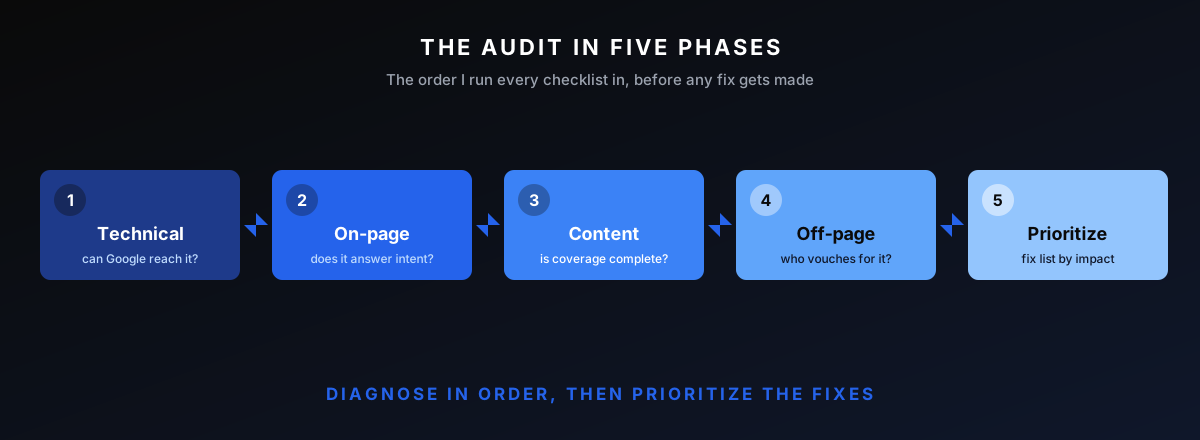
A complete checklist covers five phases: technical health (crawling, indexing, speed), on-page optimization (titles, headings, intent), content (coverage, cannibalization, quality), off-page (backlink profile and gaps), and analytics (tracking and attribution). Each phase builds on the last, so run them in order rather than jumping to whatever a tool flagged loudest.
How To Run The Audit
Work top of the funnel down. First, can Google reach and index the pages? Then, do those pages answer the query well? Then, is the content complete across the topic? Then, does anyone vouch for it? A problem in an early phase makes later phases moot, so the order is not cosmetic.
Each item below is a thing to check, why it matters, and what failure looks like. This is not 200 micro-checks. It is only the ones that actually decide whether a site ranks.
Technical Checks
Technical health is the foundation. If a page cannot be crawled, indexed, or loaded, every other optimization is wasted effort. This phase finds the problems that silently cap a whole site, including whether JavaScript rendering is hiding content from Google.
Crawlability and Indexation
Start in Search Console's index coverage report and a full crawl. Look for pages that should be indexed and are not, and pages that are indexed and should not be. A site:domain.com check against the real page count surfaces index bloat fast. Google's crawling and indexing documentation is the reference for what should and should not be blocked.
Failure looks like thousands of thin, parameter, or filter URLs eating crawl budget, or a stray noindex on a page that drives revenue. Both are common and both are quick to fix once found.
Also check the robots.txt is not blocking anything important, the XML sitemap lists only canonical, indexable URLs, and canonical tags point where they should. A sitemap full of redirects and noindex pages sends Google mixed signals about what matters.
Site Speed and Core Web Vitals
Pull Core Web Vitals from Search Console and a lab tool, then check the field data, not just the lab score. Google's Core Web Vitals guidance on web.dev defines the thresholds. The goal is passing the three metrics for real users, not chasing a perfect lab number.
Failure looks like a slow largest-contentful-paint on mobile or layout shift from unsized images and injected ads. These hurt both rankings and conversion, so they earn attention.
Mobile and HTTPS
Confirm the site is mobile-friendly, renders the same content to mobile and desktop, and serves everything over HTTPS with no mixed-content warnings. Google indexes mobile-first, so a stripped-down mobile version that hides content is a ranking problem, not just a UX one.
Failure looks like content or links present on desktop but missing on mobile, or a half-finished HTTPS migration leaving insecure resources on secure pages.
Site Architecture and Structured Data
Map how pages link together and how deep the important ones sit. Money pages buried five clicks from the homepage get little internal authority. Also check structured data is valid and matches the page, since broken schema can suppress rich results.
Failure looks like orphan pages with no internal links, a flat architecture where everything is equally deep, or schema that throws errors in the validator.
The fix is usually structural, not cosmetic: pull money pages closer to the homepage, group related content under clear hubs, and let internal links follow the topic structure. Architecture is one of the few things that lifts a whole section of a site at once.
On-Page Checks
On-page is where a crawlable page either earns its query or does not, in the classic results and in the AI Overviews built on top of them. These checks are the highest ratio of impact to effort in most audits, which is why a lot of quick wins live here.
Titles, Meta, and Headings
Check that every important page has a unique, descriptive title targeting its primary query, a single clear H1, and a logical heading structure. Duplicate or templated titles across many pages are a fast, common find. Meta descriptions do not rank, but they drive click-through, so weak ones are a conversion fix.
Failure looks like fifty pages sharing one title template, missing H1s, or headings used for styling rather than structure.
Internal Linking
Look at how internal links distribute authority and whether the important pages actually receive them. Broken internal links waste equity and frustrate users. A page with strong external links but no internal links is leaking the authority it earned. This overlaps with the same logic behind the link building workflow, applied inside the site.
Failure looks like broken links in the body, money pages with two internal links while a blog post has forty, or anchor text that says "click here" instead of describing the destination.
Search Intent Match
Check that each ranking or target page actually matches what the searcher wants. A page trying to sell when the query is informational will not rank, no matter how clean the technical setup. This is where the audit stops being mechanical and starts requiring judgment about the SERP.
Failure looks like a commercial page targeting a how-to query, or a single page trying to serve three different intents at once.
Content Checks
Content checks decide whether the site has earned topical authority or just published pages. This phase often surfaces the biggest opportunities, and the biggest cleanup jobs.
Topical Coverage Gaps
Map the site's content against the questions its audience actually asks and the subtopics competitors cover. Gaps are opportunities; a missing pillar or a thin cluster is why a site stalls. This is the operational side of a semantic SEO audit.
Failure looks like a site that ranks for a few head terms but has no supporting content, so it never builds the depth to own a topic.
Size each gap by demand before recommending it, the same way you would pick what to write next: a missing subtopic with real search volume is worth a page, a vanity topic nobody searches is not. The audit produces a content plan, not a wishlist.
Cannibalization and Thin Pages
Find pages competing for the same query and split signals, plus thin or outdated pages that add no value. Consolidating cannibalizing pages and pruning or improving thin ones usually lifts the whole cluster. Not every page deserves to exist.
Failure looks like five blog posts all targeting one keyword, or a graveyard of 2019 posts that dilute the site's quality signal.
Off-Page Checks
Off-page is the half of ranking the site does not control directly. Assess the backlink profile for both strength and risk, then look at where competitors are getting links the site is not.
Backlink Profile Health
Review the profile for authority, relevance, and risk: which links are pulling weight, which are dead, and which could be a liability. A spike of spammy links or an over-optimized anchor pattern is a flag. The full procedure is in the backlink audit guide.
Failure looks like a profile built on directories and forum links, or a sudden burst of irrelevant anchors that suggests a negative-SEO attack or a bad past vendor.
Competitor Link Gap
Pull the links pointing at the top-ranking competitors and find the relevant domains linking to several of them but not to your site. That gap is the most efficient outreach target list there is, because those sites already link to the niche.
Failure here is not a problem to fix so much as an opportunity being left on the table, which is its own kind of finding.
Analytics and Tracking Checks
Last, confirm the site can actually measure what the audit is about to change. Search Console and analytics need to be set up correctly, conversions tracked, and goals defined. An audit with no measurement is a guess, and the fixes that follow it cannot be proven.
Failure looks like analytics double-counting traffic, conversions not tracked at all, or Search Console verified on the wrong property so the data is partial.
How To Prioritize The Fixes
The checklist produces findings. The audit produces a ranked plan. Sort every fix on two axes: how much it will move revenue and how much effort it takes. Quick wins, high impact and low effort, ship first. Big bets get planned and resourced. Time sinks get dropped.
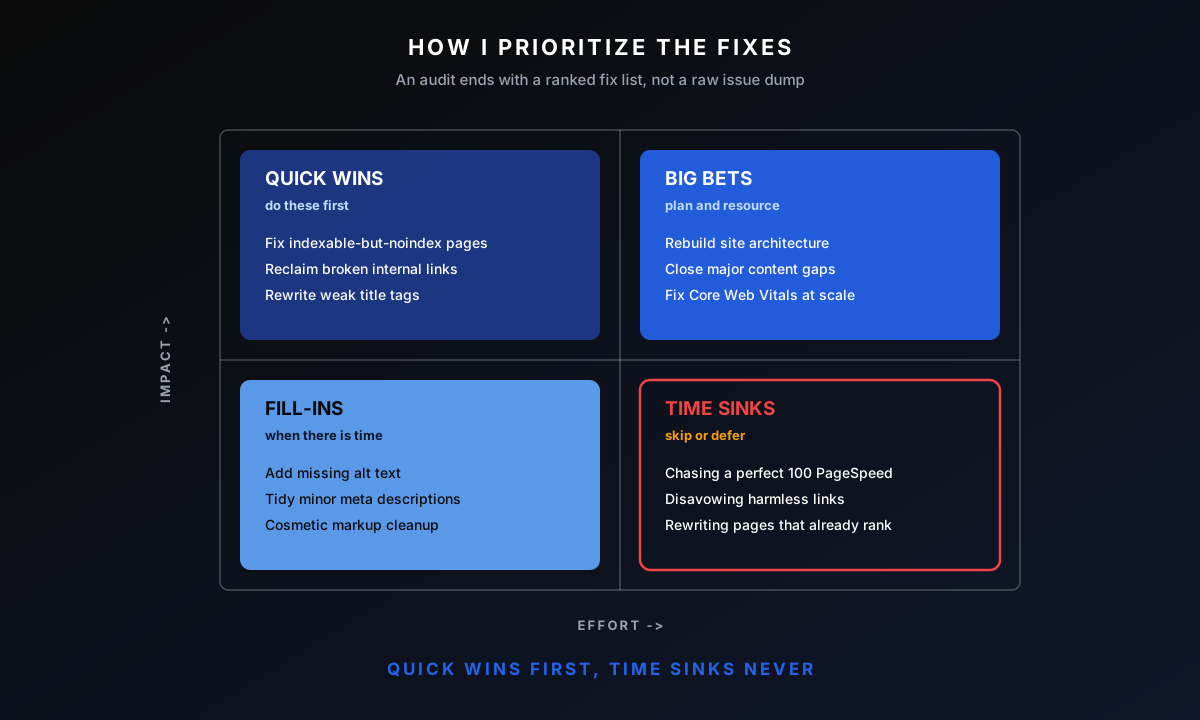
This is the step that separates an audit from a tool export. Anyone can generate a list of issues. The value is in knowing that fixing the noindex on the pricing page beats adding alt text to 300 images, and sequencing the work so movement shows early.
Also weigh dependency. Some fixes unblock others, so they jump the queue even if their direct impact is modest. Fixing crawlability before content work is pointless otherwise, because Google will not see the new content until the crawl path is clear. The sequence is part of the deliverable.
Tools To Run The Audit With
The stack is small and serves the checklist. Search Console and analytics for the ground truth, a crawler like Sitebulb or Screaming Frog for the technical phase, Ahrefs for the backlink and competitor work, and a lab tool for Core Web Vitals. An Ahrefs study found a large share of pages get no search traffic at all, usually for reasons an audit surfaces in the first two phases.
The tools find the issues. They do not tell you which matter, which is the entire reason an audit is a skill and not a button. Mojo Links runs the same stack on every engagement so the findings are comparable across sites.
Common Issues Audits Surface
After enough audits the same problems recur. Index bloat from parameter and filter URLs. Templated or duplicate title tags. Thin or cannibalizing content competing with itself. Money pages starved of internal links. A slow mobile experience nobody tested.
None of these are exotic. They are the unglamorous basics, and they are exactly what a full audit catches before a campaign starts. When a site's traffic has dropped rather than just stalled, the audit pairs with a sudden traffic drop diagnosis to separate a penalty or algorithm hit from a technical fault.
Frequently Asked Questions
How Long Does An SEO Audit Take?
A thorough audit takes a few days to a couple of weeks depending on site size, because the crawl, the manual review, and the prioritization each take real time. A five-minute tool scan is not an audit; it is the raw input an audit interprets. Rushing it produces a fix list that fixes the wrong things.
How Often Should I Run An SEO Audit?
A full audit once a year, with a lighter technical check each quarter, suits most sites. Run one immediately after a major migration, a redesign, or a sudden traffic change, since those are when new issues appear. Between audits, monitoring catches anything urgent.
Can I Do An SEO Audit Myself?
You can run the technical phase yourself with Search Console and a crawler, and catch the obvious wins. The harder part is judgment: deciding which of hundreds of findings matter and in what order. That is where experience changes the outcome, and where a second opinion pays for itself.
What Is The Difference Between a Technical and a Full SEO Audit?
A technical audit covers only the first phase, crawling, indexing, speed, and architecture. A full audit adds on-page, content, off-page, and analytics. The technical layer is necessary but not sufficient; a perfectly crawlable site with thin content and no links still will not rank.
What Tools Do I Need for An SEO Audit?
At minimum, Google Search Console, an analytics platform, a crawler such as Sitebulb or Screaming Frog, a backlink tool like Ahrefs, and a Core Web Vitals checker. The tools are the cheap part. The interpretation is what turns their output into a plan.
Want Mojo Links To Run Your Audit?
Running the checklist is straightforward; knowing which findings move revenue is the part that takes a decade to learn. We audit client sites end to end and hand back a prioritized plan, not a tool dump. If you want a fast read first, the free growth audit covers technical health, backlinks, content gaps, and AI visibility in 20 minutes.

About Bart Magera
Bart Magera is the founder of Mojo Links. Ten years across YMYL verticals (legal, medical, finance, supplements, crypto, gambling). Trained under Koray Tuğberk Gübür's Topical Authority framework. Author of two SEO books and international speaker.
Want this kind of analysis on your site?
Get a free video walkthrough within 48 hours covering technical health, backlinks, content gaps, and AI visibility.
Related posts
Keep reading on adjacent topics.
- SEO
 Bart Magera9 min read
Brand Mentions for SEO: Linked, Unlinked, and AI Citations
Most SEO budgets still treat a mention without a link as a failed pitch. That math is out of date. The same editorial naming that builds your entity in Google now decides whether AI engines name you in answers. Here is the value model behind linked, unlinked, and AI-cited mentions, and the three lanes for earning more of them.
- SEO
 Bart Magera12 min read
AI Visibility Tools: 9 Trackers Ranked and Compared
Nine AI visibility tools, one yardstick: engines covered, what gets measured, competitor tracking, and price. Every page-one comparison of these trackers is written by a vendor ranking its own product first. This one is not. Here is where each tool fits, from a $29 entry plan to enterprise quotes, and the one thing none of them can do.
- SEO
 Bart Magera10 min read
ChatGPT Brand Mentions: How To Track and Earn Them
When a buyer asks ChatGPT for the best option in a category, it names a few brands inside the answer. Those ChatGPT brand mentions, not the linked citations beneath them, are what get you recommended. Here is how to track them and how to earn them.