

6 Outreach Email Templates That Actually Get Replies
Listen to this article
Browser-native voice. No account required.
Six templates do most of the conversion work across Mojo Links campaigns. The rest of the dozens tested across engagements either underperformed, broke under volume, or got flagged as templated by editors. This post covers the six in active use today, with real subject lines, real openers, and the conversion rate each one produces. Use them as starting points; rewrite per client voice before sending.
How Do Good Outreach Templates Differ from Bad Ones?
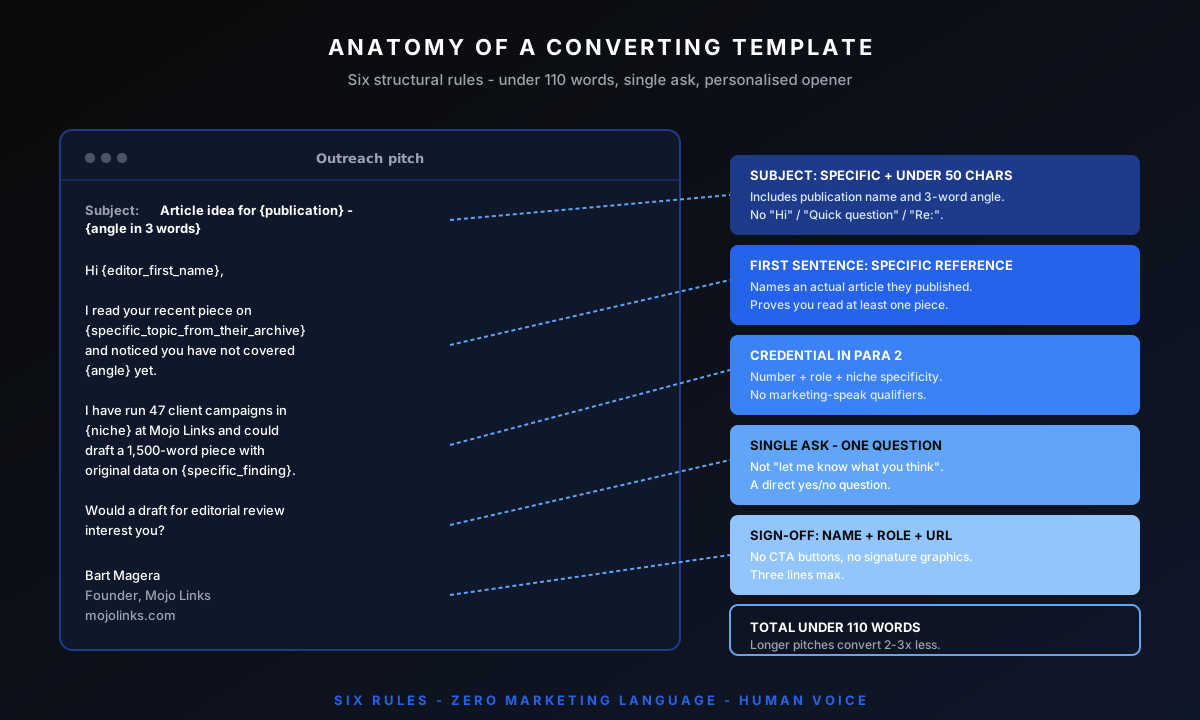
Three structural rules separate templates that convert from templates that get filtered. First, personalisation happens in the subject line and first sentence, not in a tacked-on closing paragraph. Second, the ask is single and specific - one link, one anchor preference, one URL. Third, the entire email is under 110 words, including signature. Templates that violate any of these three rules drop conversion by 50-70%.
The templates below match the tactic taxonomy in the manual link building guide and the workflow phases covered in the pillar.
Template 1: Guest Post Pitch
Subject: Article idea for {{publication_name}} - {{angle_3_words}}
"Hi {{editor_first_name}},
I read your recent piece on {{specific_topic_from_their_archive}} and noticed you have not covered {{angle}} yet. I run SEO and link-building campaigns for {{niche}} clients at Mojo Links and could draft a 1,500-word piece with original data on {{specific_finding}}.
Would a draft for editorial review interest you? Happy to send an outline first."
Sign off: name + role + url. No CTA buttons. No attachments.
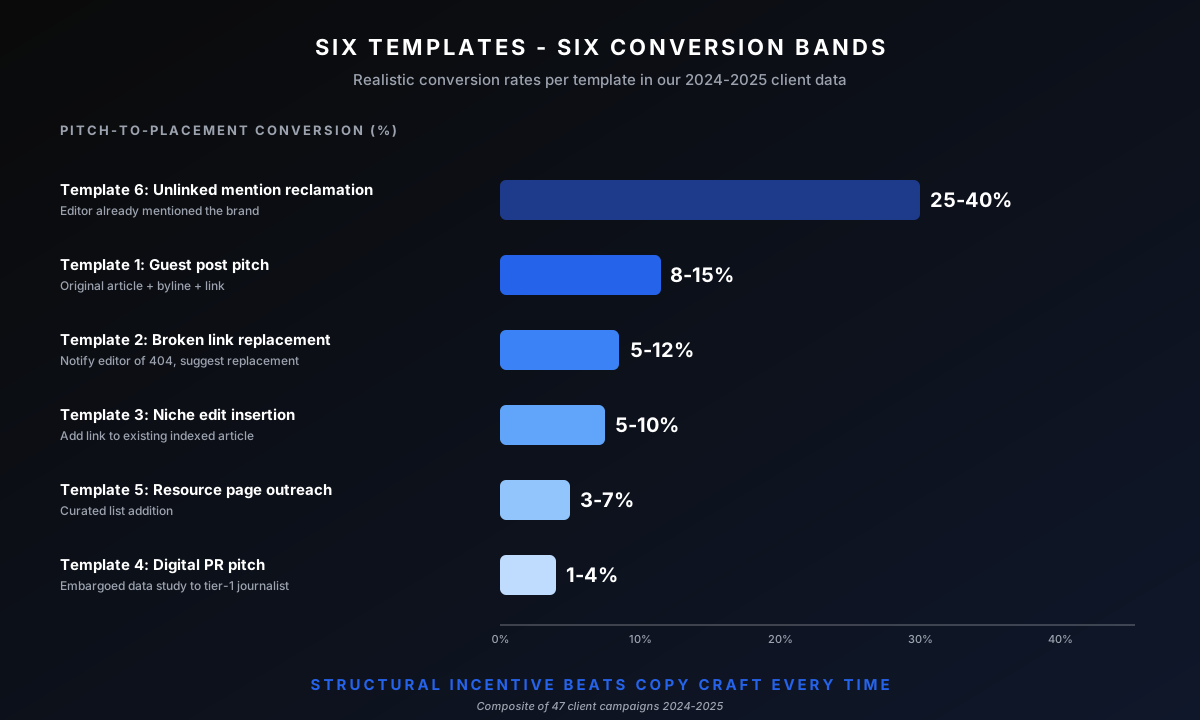
Realistic conversion: 8-15% on properly qualified publications. The variant uses a different angle per editor; one master template would burn out after 50 sends.
Template 2: Broken Link Replacement
Subject: Broken link on {{exact_url_of_page}}
"Hi {{editor_first_name}},
Realistic conversion: 5-12% on qualified prospects. The framing ("just thought you would want to know") removes the marketing-pitch feel that editors filter. Detail on the qualification step sits in the broken link building guide.
No promotional intent, just thought you would want to know. Use the replacement only if it fits."
Sign off: name + role + url.
Realistic conversion: 5-12% on qualified prospects. The framing ("just thought you would want to know") removes the marketing-pitch feel that editors filter. Detail on the qualification step sits in the [broken link guide].
Template 3: Niche Edit Insertion
Subject: Update suggestion for your {{topic}} guide
"Hi {{editor_first_name}},
Your guide on {{topic}} ranks well for {{their_target_keyword}} but mentions {{outdated_reference}} without a current source link. I have a 2024 piece with verified data: {{your_url}}.
Worth adding as a reference in paragraph {{paragraph_number}}? No expectation - happy to suggest others if it does not fit."
Sign off: name + role + url.
Realistic conversion: 5-10%. The paragraph-level specificity proves you actually read the page. Generic "loved your article" openers convert below 2%. Connects to the niche edits workflow.
Template 4: Digital PR / Journalist Pitch
Subject: Original data on {{trend_or_topic_relevant_to_their_beat}}
"Hi {{journalist_first_name}},
You covered {{their_recent_article_topic}} last week. We just finished a study of {{n}} {{things_studied}} showing {{headline_finding}}.
Embargoed until {{embargo_date_72_hours_out}} if you want first coverage. Full methodology and dataset available."
Sign off: name + role + url.
Realistic conversion: 1-4% on tier-1 publications. The embargo offer is the conversion driver - it gives the journalist exclusivity, which is what they actually want.
Template 5: Resource Page Outreach
Subject: Asset suggestion for your {{topic}} resource page
"Hi {{curator_first_name}},
I came across your {{exact_page_title}} - solid list, especially the inclusion of {{specific_item_from_their_list}}.
I built a {{type_of_asset}} on {{specific_topic}} that would fit alongside {{adjacent_item}}: {{your_url}}.
No expectation - skip if it does not match your editorial standard."
Sign off: name + role + url.
Realistic conversion: 3-7%. Two specific references (an item already on the list, and the adjacent item your asset slots next to) prove you understand the curation. The full tactic playbook lives in the resource page guide.
Template 6: Unlinked Brand Mention Reclamation
Subject: Quick link request for your {{article_title}}
"Hi {{editor_first_name}},
Thanks for mentioning {{brand_or_product}} in your piece on {{topic}}. Would you be open to adding a link to {{specific_url}}? Happy to share additional context if useful for future pieces."
Sign off: name + role + url.
Realistic conversion: 25-40%, the highest of any tactic. The structural incentive (editor already mentioned you, link adds no editorial burden) carries most of the conversion. The full reclamation workflow sits in the unlinked mention reclamation guide.
How Do You Personalise Templates Without Breaking Them?
Three operational rules.
Reference one specific page or article they have published, by exact title or URL. Generic references ("loved your blog") fail. The reference must show you read at least one of their pieces.
Mention one named person on their team if discoverable. A colleague's name in the opener doubles reply rates on cold pitches. The catch: misnaming someone burns the entire campaign at that publication.
Vary the angle per recipient. A template sent unmodified converts at marginal rates. The same template with the angle rewritten per niche converts at substantially higher rates, and that lift is the single largest controllable variable in the link-building outreach process.
What Template Mistakes Get Pitches Filtered Immediately?
Six mistakes account for most failed pitches.
Generic "Hi there" or "Dear webmaster" openers. Auto-filter trigger across modern mail providers.
Attached files. PDF attachments and Word docs trigger spam-detection and remove all inline link tracking.
Multiple URLs. One URL per pitch maximum. Multiple URLs look like sales spam.
CTA buttons and HTML formatting. Plain-text emails convert substantially better than HTML-formatted pitches - editors filter HTML mass-send patterns aggressively in 2026.
Subject lines with "Important", "Re:", or fake reply markers. Mail filters and editors both flag these.
Mentions of "SEO", "backlink", or "DR" in the email body. The terms signal you are not interested in editorial fit, just link acquisition. Strip them. The qualification logic sits in the broader link prospecting workflow.
How Do You Sequence Follow-Up Emails?
Two follow-ups maximum per prospect. Send the initial pitch. Wait 7 days. Send Follow-up 1 (60-80 word reminder referencing the original message). Wait 14 more days. Send Follow-up 2 (40-50 word final check-in). Move to 90-day cool-off list if no response. Three follow-ups or more damages relationships at the publication.
How Did Mojo Links Arrive at These Six Templates?
Each template above is the survivor of iteration across Mojo Links campaigns. We tracked open rate, reply rate, and placement-conversion rate per template variant. Templates that failed to clear our internal thresholds got dropped. The six above are what we have in our active Pitchbox library as of Q2 2026.
Frequently Asked Questions About Outreach Email Templates
Can You Copy These Templates Verbatim?
Technically yes. Operationally no. Templates copied verbatim across multiple agencies become detectable patterns within 90 days. Rewrite each template in your own voice and adjust the structure per client niche. The underlying structure (personalisation, single ask, under 110 words) is the part that transfers.
Should You Use AI To Personalise Outreach?
Partially. AI-drafted openers convert below 2% in Mojo Links' tests because editors detect templated language. AI for prospect research and asset summarisation works fine. The actual outreach copy must come from human writing.
What Is The Right Reply-To Address for Outreach?
A real human inbox monitored daily by a real human. Generic "outreach@" or "marketing@" addresses convert below 1%. Personal-name addresses ("bart@mojolinks.com") convert 3-5x better.
Should You Warm Up The Sending Domain Before Bulk Outreach?
Yes. New domains or new sending addresses need 4-6 weeks of warming before sending more than 20-30 emails per day, and the SPF, DKIM, and DMARC setup that Google's email sender guidelines require. Skip this and Gmail and Outlook spam filters will throttle the entire campaign.
Can You Send Outreach from a Gmail Account or Do You Need a Custom Domain?
Custom domain only. Gmail and other free-tier addresses convert below 1% on cold outreach because publishers filter them. Use your client's actual brand domain (with proper SPF/DKIM/DMARC) for outreach.
Want Us To Run Outreach for Your Link Building Campaign?
Senior outreach is the largest line item in every link building program we run. Templates above sit in our active library; we adapt them per client voice and niche. Book a slot to discuss your campaign.

About Bart Magera
Bart Magera is the founder of Mojo Links. Ten years across YMYL verticals (legal, medical, finance, supplements, crypto, gambling). Trained under Koray Tuğberk Gübür's Topical Authority framework. Author of two SEO books and international speaker.
Want this kind of analysis on your site?
Get a free video walkthrough within 48 hours covering technical health, backlinks, content gaps, and AI visibility.
Related posts
Keep reading on adjacent topics.
- Link Building
 Bart Magera10 min read
Contextual Backlinks: What They Are, Why They Win, and How To Earn Them
A contextual backlink sits inside the body of an article, surrounded by relevant text, not in a footer or author bio. That placement is what gives it weight. Here is what contextual backlinks are, what makes one high quality, how to earn them, and how to spot the cheap fakes.
- Link Building
 Bart Magera12 min read
What Is White Hat Link Building? Techniques That Work in 2026
The Problem: Why Most Link Building Fails Your SEO You wrote great content. It’s relevant. It’s useful. It even has infographics. But guess what? Crickets. Nobody’s linking. Google’s not ranking. And your “ultimate guide” is buried somewhere on page 7 under a recipe blog and a…
- Link Building
 Bart Magera10 min read
Tiered Link Building: How It Works and How To Do It Safely
Tiered link building layers weaker links behind your strongest ones to pass more authority to your money pages. Here is how the pyramid works, how to build one, which links are worth tiering, the risk SpamBrain introduced, and the lower-risk path I use on client sites.